The back officethat readsyour registers.

Live sales from every station within minutes of the sale. Shift reports that build themselves at day close. Invoices read from a photograph. One price book for every location. Built by an operator, for operators — and priced at $249 a store.

Gilbarco Passport Verifone Commander 1 to 1,000 locations Web + phone
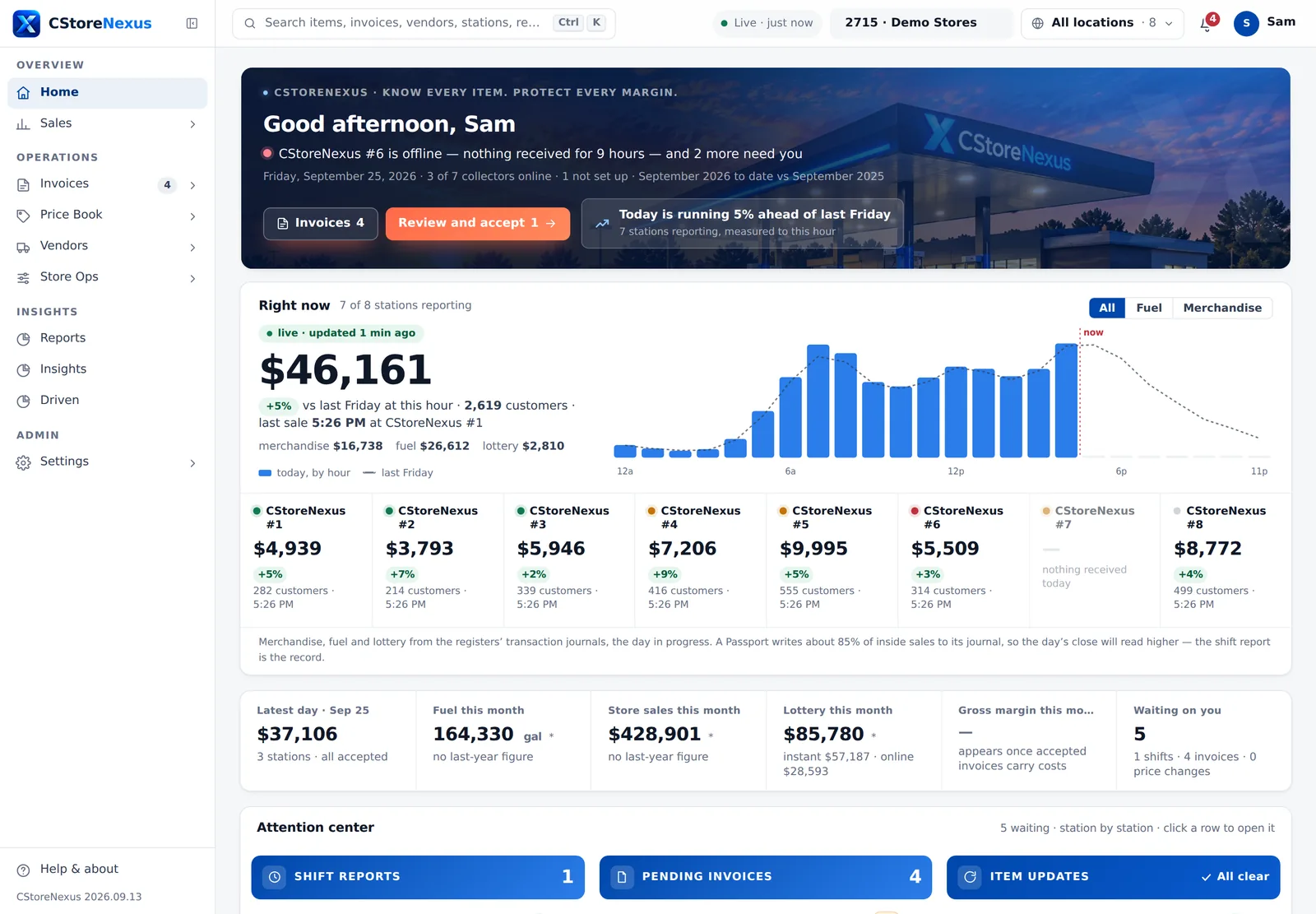
Right now 8 of 9 stations reporting live · updated just now
$0
+8% vs last Sunday at this hour · 3,601 customers · last sale 4:38 PM at CStoreNexus #6
today, by hourlast Sunday
CStoreNexus #5$12,944+9%
CStoreNexus #2$9,659+4%
CStoreNexus #6$7,386−3%
CStoreNexus #4$6,151+12%
0secThe collector reads your register's own files every minute, from the store PC you already have.
0minDay close to a finished shift report, built from the register's authoritative totals.
0+Reports, each with the same period, comparison and station bar — no report has a Run button.
0Automated checks run against every screen before a release ships to you.
The product

Every number on the screen can be traced to a file the register wrote.

CStoreNexus does not ask you to type in what the register already knows. It reads the journals and day-close files Passport and Commander write anyway, and turns them into the screens you actually run the stores from.

Live sales

Today, as it happens, at every station.

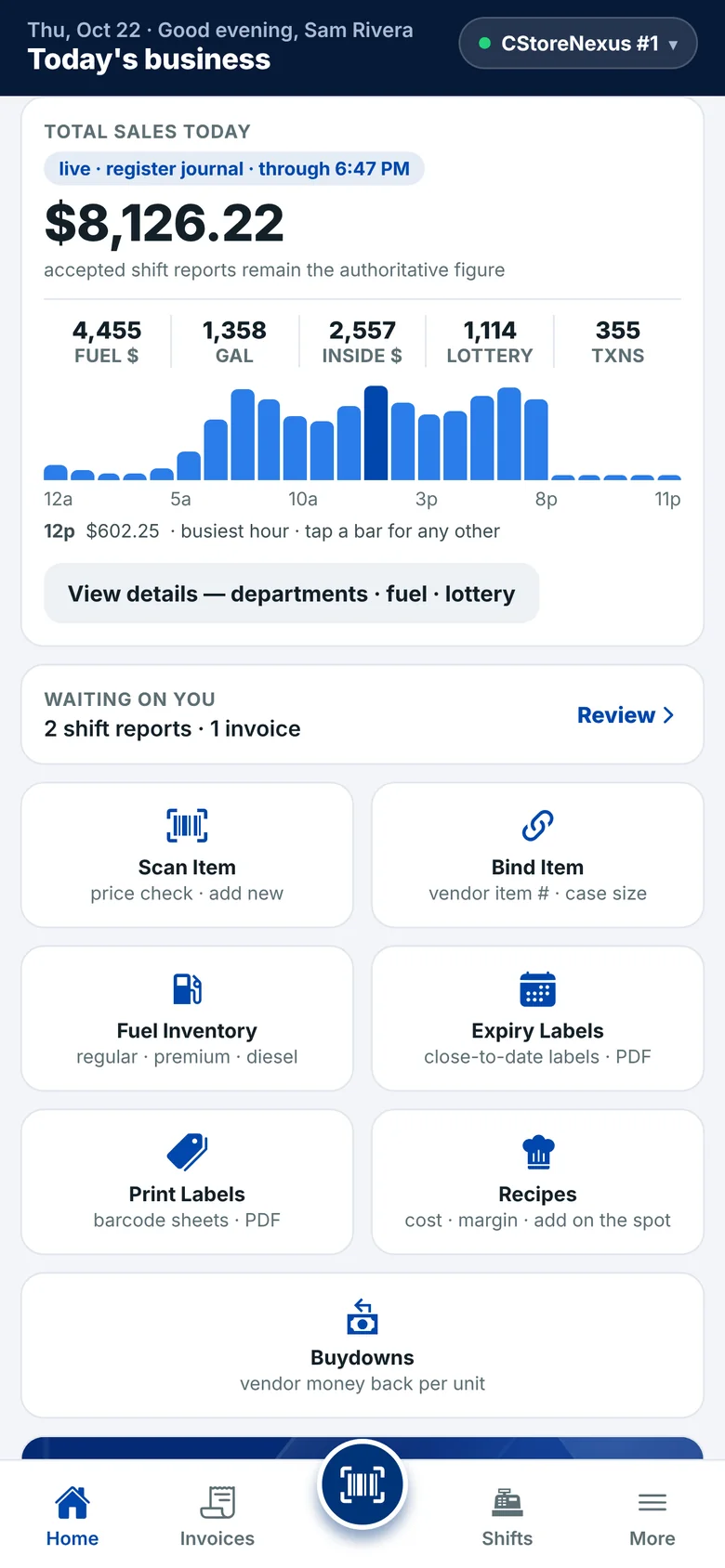
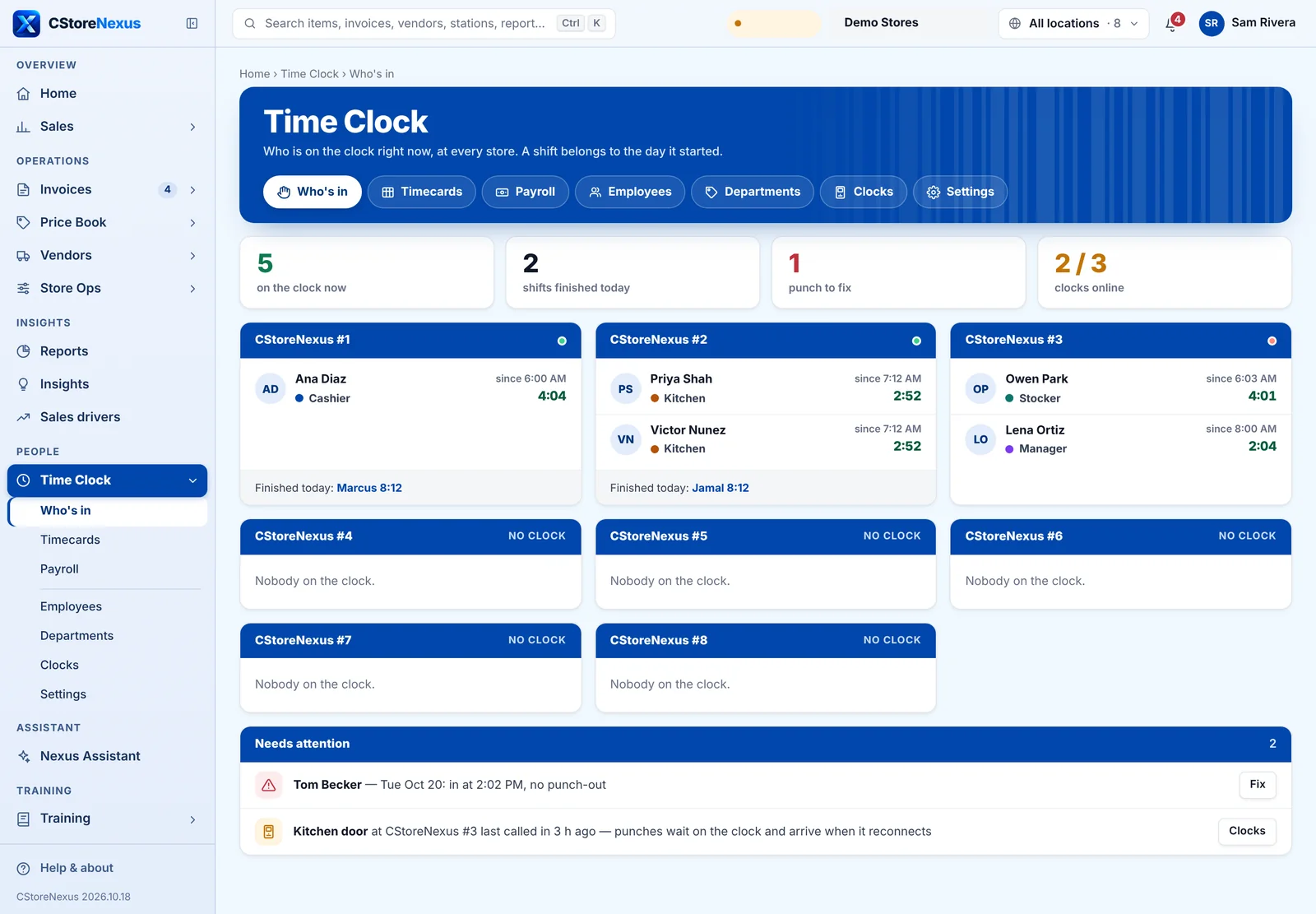
The Right-now band on Home reads each station's day in progress straight from the registers' transaction journals — merchandise, fuel and lottery by the hour — and moves as the files land. Pace is measured against the same weekday last week, to this hour, never against its whole day.

  • All · Fuel · Merchandise — one toggle narrows the whole band, and the split under the figure shows the arithmetic.
  • A card per station with its own pace chip and 24-hour spark; a click opens that station's Live Sales.
  • Hour windows — overnight, morning, afternoon, or pick the hours — with departments that open up to the items that sold.
app.cstorenexus.com/#/home
The CStoreNexus Home screen on a demo account: the brand band, the live Right-now band with a card for each of eight stores, and the Attention Center
Shift reports

Built at day close. Reviewed in one queue. Nothing counts until you accept it.

When a register closes its day, the report is already built from the movement files — the authoritative totals, not the journal's estimate. Every waiting day sits in one queue across all your stations, judged by the same rules Home uses: voids or no-sales against that station's own normal, scan rate, a day with two closes, a station with no baseline yet.

  • “Accept the 4 with nothing flagged” — the named list first, then one click. Never a blind bulk accept.
  • A and S keys on a report: accept on the register's date and open the next one that needs a look, or skip.
  • “21× usual” — voids, no-sales and refunds against the station's own accepted days, each linking to the events behind the count.
app.cstorenexus.com/#/shifts
The review queue: shift reports to accept, the ones that need a look on top, the ones with nothing flagged below
Invoices

Photograph it. The system does the work.

A vendor invoice — a photo from the phone, a PDF, a vendor's own file — is read line by line, matched against your price book, and checked against the invoice's own totals before it touches your books. The invoice opens with six tiles that say what was done and what needs you: lines read, matched, cost increases, unknown SKUs, and whether it balances.

  • Scan the carton on the phone — one scan, ten lines, and the app never asks a stocker for a retail or a category.
  • Cost changes with the margin in view — a cost that rose shows the retail beside it, and the new margin, before you accept.
  • A vendor dictionary that learns each vendor's item numbers, so the second Core-Mark invoice reads better than the first.
app.cstorenexus.com/#/invoice
An invoice from Core-Mark with the six tiles: vendor identified, lines read, matched, cost increases, unknown SKUs, balances
Price book

One product, one price per location — and the margin right there in the row.

Thirty-five thousand items, imported from the export you already have. Cost, margin, what your other stations charge, and a suggested retail sit beside the price at the station you're looking at. Change a retail in the row and it is queued for that register, guarded by your min and max.

  • Price groups and promotions — a group outranks the item, a change names every register on the account, whoever queued it.
  • Margin leakage — a filter for items sitting more than five points under their department's median at this station.
  • Written in the register's own language — Passport's ITT, ILT and MMT files, Commander's item and mix-match tables — and held in a queue you accept.
app.cstorenexus.com/#/items
The Price Book items list with Cost, Margin, Elsewhere and Suggested columns beside Retail
Reports

Seventy reports. One filter bar. No Run button.

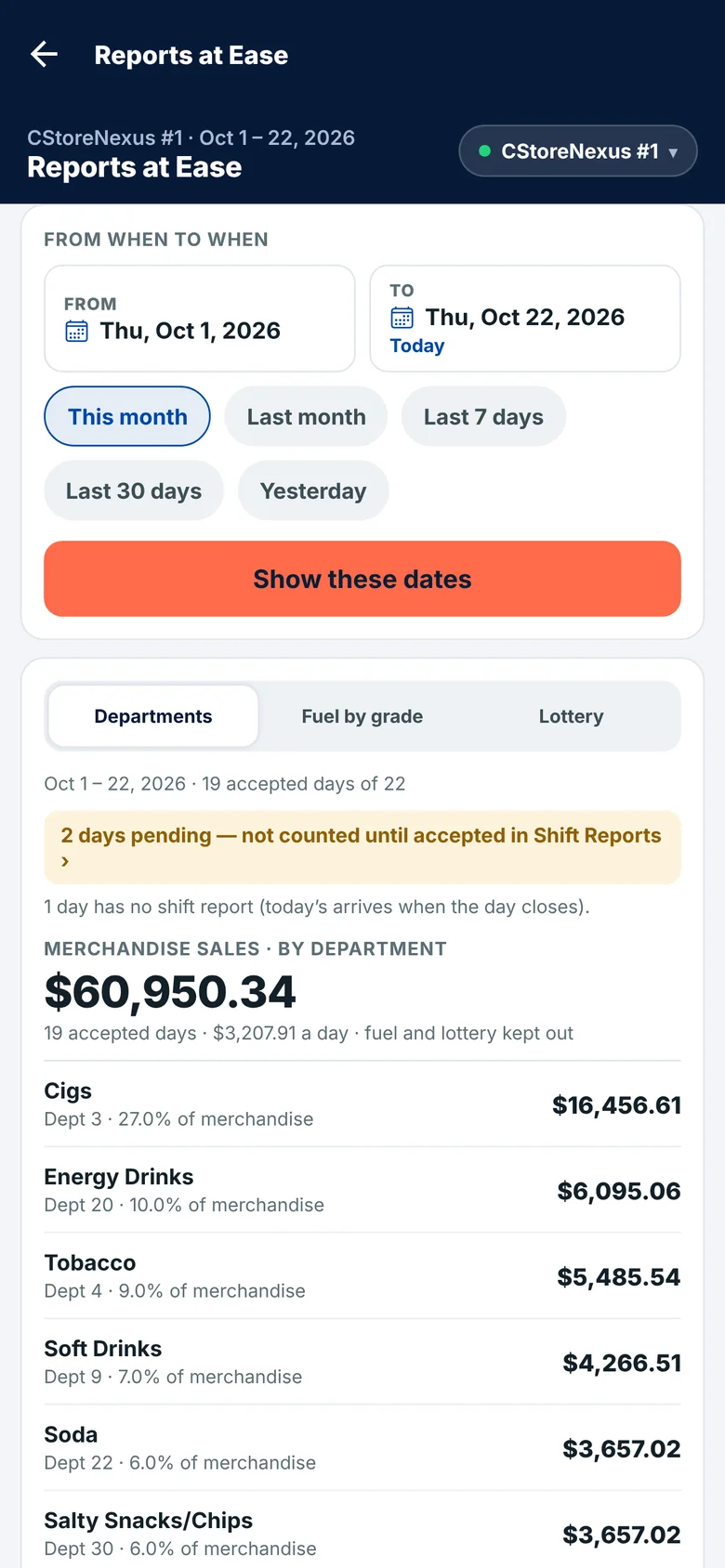
Period, compare, stations, group by, filter, search — the same bar on every report, and the comparison window is derived from the period so a part-month is never set against a full month. Charts answer on hover; a line chart names every series' value at the day under your cursor.

  • Store Sales Detailed, Departments, Item Sales by Tags, Comparison, Six Weeks, Sales History and the rest of the library.
  • Today · 7d · 30d · MTD · YTD one click each; every report prints the date its data runs through.
  • Profit per station — each store's own cost against its own sales, which the register alone never tells you.
app.cstorenexus.com/#/report/9789
Store Sales Detailed with the shared filter bar, a KPI strip and a bar chart of total sales by day
How it works

No API, no new hardware. The register writes files; we read them.

Passport and Commander have no database to connect to — they write XML to a share on the store PC. A small agent on that PC watches the share, uploads what arrives, and never deletes a thing, so the store keeps its own backup.

Register Passport · Commander Collector the store PC Cloud built · every 20 min You web · phone every 1 min every 5 min live Journals (PJR) arrive within minutes and carry every transaction with its time — Live Sales and Hourly Sales. Movement files (MSM · MCM · FGM · ISM) arrive at day close and carry the authoritative totals — Shift Reports. They never agree to the penny, and the product says on every page which one it used.
Passport and CommanderRead through the XMLGateway share each register already exposes. A site that only hands over a journal is read from that.
Every day rolls at store closeNot at midnight. The day boundary is read from the file every time — the previous close, else the first sale.
Fuel prepay counted onceA prepaid fill's completion restates the whole sale. The original is dropped whole, basket included, so nothing is double counted.
Nothing is deletedThe files on the store PC stay put. Snapshots are kept before any rebuild, and you can see when each station last sent a file.
The operator's rule

Nothing counts until a person accepts it.

A shift is invisible to every report until it is accepted. An invoice's costs do not touch a margin until it is accepted. A price change is not on the register until the register's own acknowledgement says so. Try it.

Shift reportPending

CStoreNexus #2 · Sun 13 Sep

Total sales$12,426.28 Customers963 Voids10 · $47.27 as usual No sales19 as usual Scan rate98.2%
Reports · Store sales this monthaccepted days only
$436,814
3 days not yet accepted — this figure does not include them
Sat 12 Sep$11,910.40
Fri 11 Sep$12,088.77
Thu 10 Sep$10,287.51
ShiftsAccepted on the business date the register stamped — re-dating is a separate, deliberate step, never a side effect.
InvoicesRead, matched and gated by the invoice's own arithmetic; costs and margins move only when you accept.
RegistersA price change is written in the register's format and queued. Only the register's ACK counts as “on the till”.
Honest by design

A confident number you cannot trace is worse than a dash.

Empty is honest

A station that sent nothing today says nothing received — never $0. A report with no accepted days says so instead of drawing a zero.

no journal for last Sunday to compare
Every page names its source

Journals or day-close files, and the date the data runs through. A Passport writes about 85% of inside sales to its journal, so the live figure is labelled the day in progress, and the shift report is the record.

data through Sep 13, 2026
Each location keeps its boundary

Cost, retail, margin and inventory are per store. An account dashboard adds the stores up; it never blurs them. Adding a store needs zero setup in the software.

one product ≠ one price
Everything in it

The whole back office. Not a module list.

One subscription, every screen. These are the pages in the sidebar today.

SalesShift ReportsBuilt at day close, one review queue, accept on the register's date, anomalies against the station's own normal.
SalesLive SalesToday in progress per station: merchandise, fuel, lottery, gallons, departments down to the item.
SalesHourly SalesAny day or range by the hour; a department, fuel or lottery view; CSV export.
SalesSales HistoryStore and department history across the months, accepted days only.
InvoicesPending · Processing · AcceptedSix states, one triage rule shared with the phone; waiting-on-you and waiting-on-manager kept apart.
InvoicesUpload, scan, enterA photo, a PDF, a vendor file or a manual entry; the document scanner for the rest.
InvoicesCost ChangesEvery cost that moved, with the retail and the new margin beside it.
InvoicesVendor DictionaryWhat each vendor calls each item, learned from accepted invoices.
Price bookItemsCost · margin · elsewhere · suggested beside retail; inline edit; margin-leakage filter; the item log.
Price bookPrice Groups · Promo Groups · PromotionsA group outranks an item; a promotion reaches every register.
Price bookItems UpdatesThe register queue: every change, per station, accepted before it is written.
Price bookCR Departments · CategoriesThe register's departments and your own categories, side by side.
VendorsVendors · Vendor ReportPurchases by vendor, item numbers per vendor, the bills behind them.
Store opsFuelSales by grade, gallons, average price, and an honest inventory page.
Store opsRecipes · BuydownsPer-location recipe cost from real invoice costs; buydown agreements on price groups.
Store opsExpiry Labels · Print LabelsLabel sheets from the price book, on the sheets you already buy.
ReportsThe librarySeventy-plus reports on one shell: period, compare, stations, group by, filter, hover values.
SettingsLocations & CollectorEvery station, when it last sent a file, and what is missing.
SettingsUsers & AccessOwner, Admin, Supervisor, Manager, Employee. A named location list hides every other store.
PhoneThe appHome, shift reports, alerts, invoice scanning, price check and labels, on iPhone and Android.
On the phone

The same numbers in your pocket. The carton scanned in the cooler.

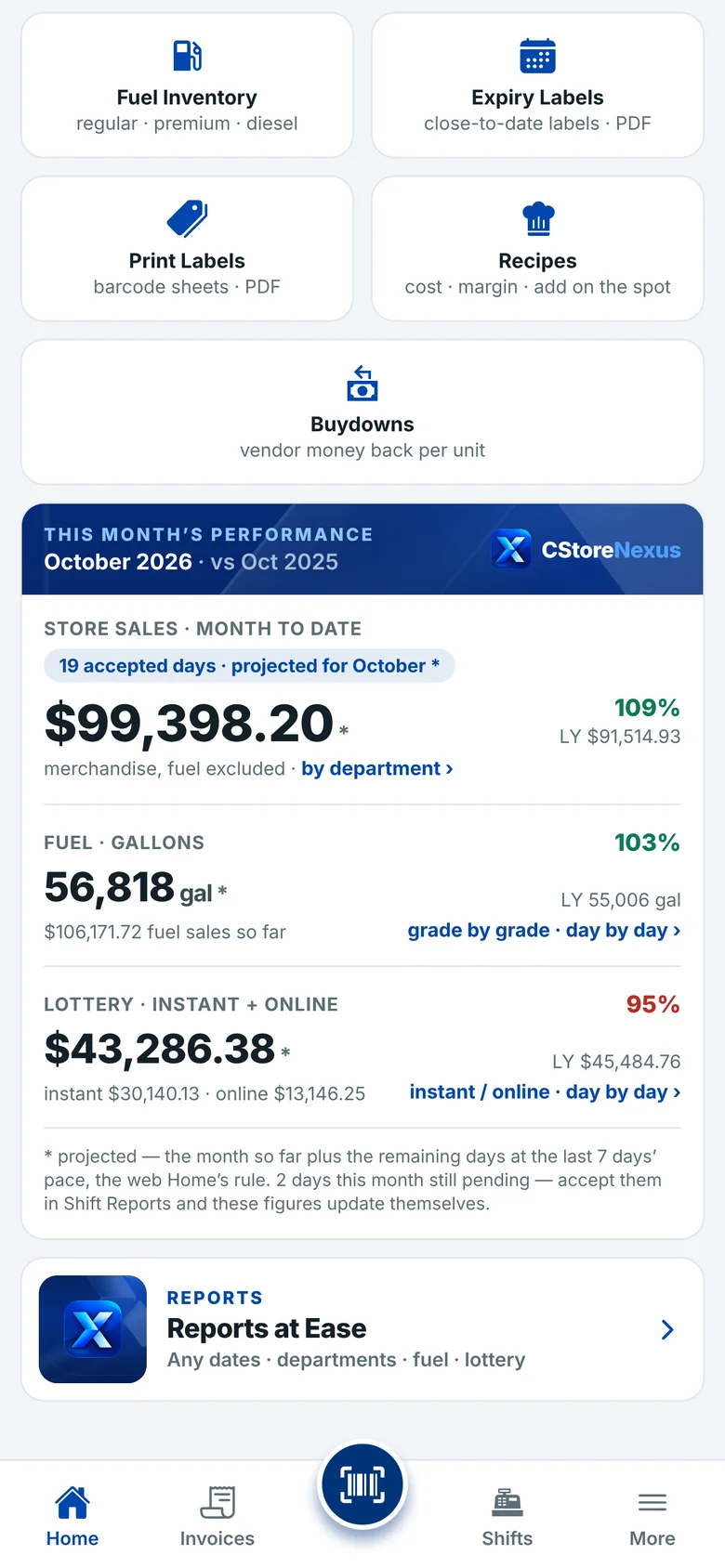
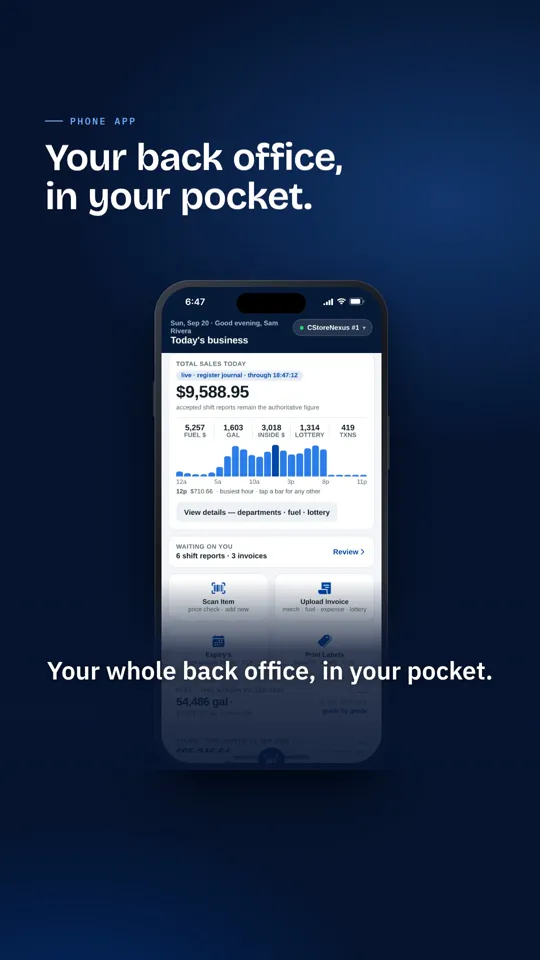
Home, today's live sales, the shift reports waiting on you and the alerts that matter — re-read every time you open the app. An invoice starts with a scan of the carton: one scan, ten lines, matched on the spot. A price check reads the full item and its price group.

The phone Home screen with the live Right-now band
Live Sales on the phone
Pricing

One price. Every store. Everything in it.

A subscription, per store, month to month. No modules to buy, no per-report fees, no per-user seats. Add a store and it is one more line on the bill, not a project.

Unlimited people

Owners, supervisors, managers and employees, each seeing only the stores they hold.

The phone app included

For every person on the account, on their own phone.

Your data stays yours

The register's files stay on your store PC. Reports export to CSV whenever you like.

Per store
$249per store
per month
  • Live sales, hourly sales and shift reports
  • Invoice reading from photos, PDFs and vendor files
  • The price book, price groups, promotions, buydowns
  • Every report in the library, with CSV export
  • The collector for Passport and Commander, and the phone app
  • Unlimited users, every update, and a person to call
$1,992 / month$23,904 a year, all in
Questions

The ones every operator asks first.

Which registers does it work with?
Gilbarco Passport and Verifone Commander (Ruby), through the XMLGateway share each of them already exposes on the store PC. A site whose register only hands over a transaction journal is read from that journal. If you run something else, ask — the collector reads files, and most registers write them.
Do I need new hardware, or a technician at each store?
No. The collector is a small Windows agent that installs on the office PC you already have at each store. It watches the register's share, collects every minute, uploads every five, and never deletes a local file. Installing it is a short remote session per store.
How does my price book get in?
From the export you can already make — CStoreOffice's item export, or the Passport's own price book export from the Manager Workstation. Thirty-five thousand items import in one pass, with cost and retail kept per location. Nothing is typed twice.
Can I trust the live number?
Trust it for what it is, and the screen tells you what it is. The live figure comes from the register's transaction journal, which lands within minutes; a Passport writes roughly 85% of inside sales to that journal. The shift report, built at day close from the register's movement files, is the record — and every report runs on accepted shift reports only.
Who can see what?
Five roles. Owners, Admins and Supervisors accept and change things. Managers and Employees see, and only the stores on their list — every other store is removed from their view at sign-in, not merely hidden on the screen. Access is granted by an Owner and can be turned off in one click, with the phone signed out too.
What happens to my data if I leave?
Your register's own files never left your store PC in the first place — the collector copies, it does not move. Every report exports to CSV. Your account is suspended, never deleted, so nothing is lost by accident.
Book a walkthrough

See it on your own stores, not a demo account.

Thirty minutes over a screen share. Bring one store's numbers you know by heart; we'll put the collector on that store and you can watch today's sales arrive while we talk. No card, no contract, no pitch deck.
Memphis, TennesseeBuilt by an operator of nine stations
Opens an email to us with the details filled in. We reply within a business day.